
Every service business knows this pain: you finish a deliverable, email it to the client, and then… you wait. Days pass. You send a follow-up. More days. You call. The client says they’ll look at it this afternoon. A week later, you’re still waiting, and the project timeline is shot.
The approval bottleneck isn’t caused by clients who don’t care. It’s caused by a process that makes approvals inconvenient. The deliverable is buried in an email thread. The client isn’t sure which version is current. They don’t know where to leave feedback. So they put it off.
Client approval workflows in a customer portal fix this by giving clients a single place to review, comment on, and approve deliverables — with clear visibility into what’s waiting for them and what happens next.
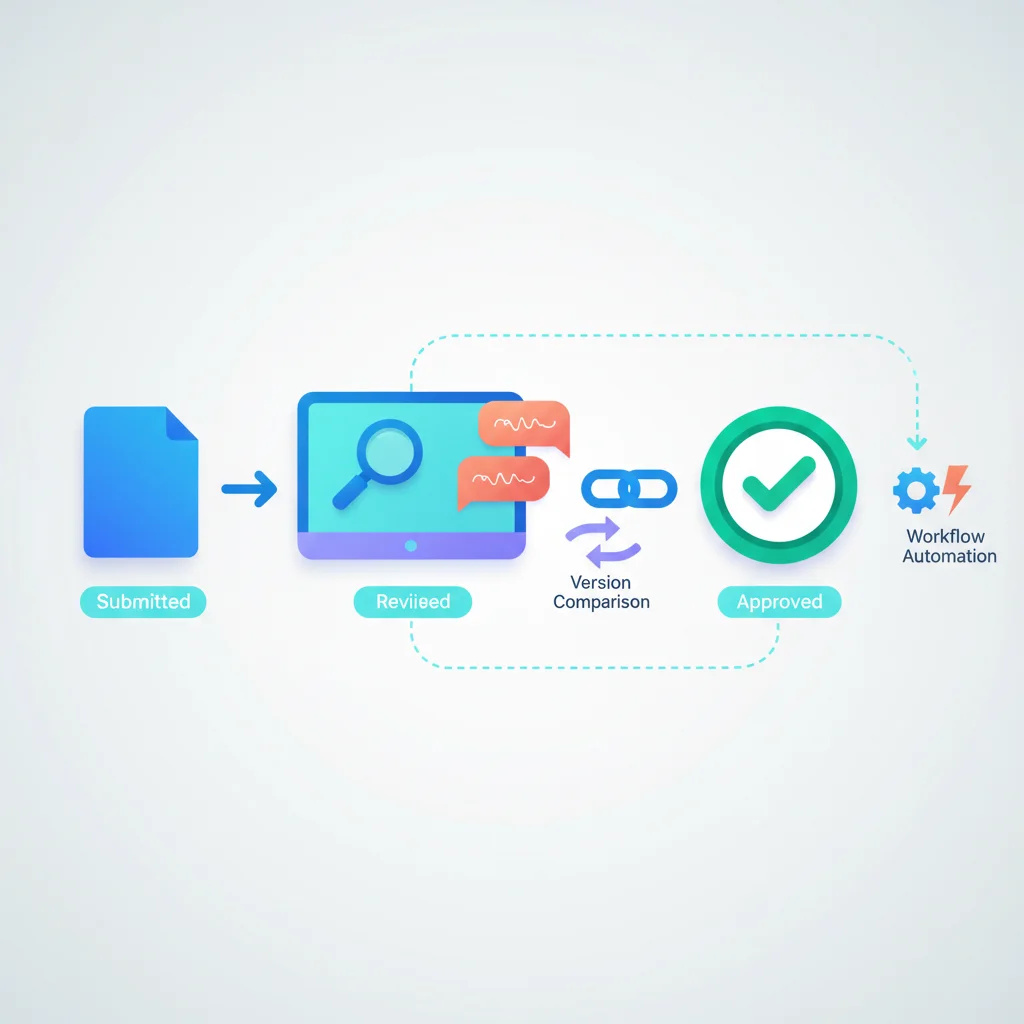
How Portal-Based Approvals Work
The workflow is straightforward but powerful:
- Your team submits an item for approval — A design mockup, a report draft, a change order, a project deliverable. It’s uploaded to the portal with context: what it is, what the client should review, and when you need a decision.
- The client is notified — Through email, push notification, or in-portal alert. The notification links directly to the item, so there’s no searching through inboxes. Your notification system handles the delivery.
- The client reviews in context — They see the item in the portal alongside project information, previous versions, and any relevant documents. Everything they need to make a decision is in one place.
- The client takes action — Approve, reject, or request changes. They can leave comments, annotate specific parts of a document or design, and tag specific people.
- The next step triggers automatically — An approval might release the next project phase, generate an invoice, or notify your production team. A rejection routes back to the responsible team member with the client’s feedback attached.
No email chains. No lost attachments. No ambiguity about which version was approved or when.
Key Capabilities
Version comparison
When you submit a revised version, the client should be able to see what changed. Side-by-side comparison for documents and designs, redline views for contracts, change logs for technical deliverables. This saves the client from re-reviewing everything from scratch and focuses their attention on what’s actually different.
Inline comments and annotations
General feedback like “I don’t like it” isn’t actionable. Inline commenting lets clients click on a specific part of a document, a section of a design, or a line in a report and leave targeted feedback. “This headline should reference the Q2 numbers instead” is feedback your team can act on immediately.
Approval chains
Not everything needs just one person’s sign-off. A change order might need the project manager’s approval, then the finance director’s. A marketing campaign might need the brand manager, then legal, then the VP. Approval chains let you define the sequence, and the portal routes the item to each approver in order.
Deadline tracking
Every approval request should have a due date. The portal shows the client what’s pending and when decisions are needed. Automated reminders escalate as the deadline approaches: a gentle nudge at 3 days out, a more urgent reminder at 1 day, and an overdue alert if the deadline passes.
Audit trail
Who approved what, when, and with what comments — this history is captured automatically. For industries with compliance requirements, this audit trail is essential. For every business, it prevents disputes. “We never approved that change” becomes a resolvable question instead of a he-said-she-said argument.
Conditional logic
Approvals can trigger downstream actions: approved items move to production, rejected items create revision tasks in your project tracking system, and change orders update budgets automatically. This removes manual handoffs and keeps projects moving.
The Cost of Slow Approvals
Approval delays aren’t just annoying — they’re expensive:
- Project timeline slippage — Every day a deliverable sits waiting for approval is a day the project falls behind. For construction companies, this can mean idle crews and equipment.
- Cash flow impact — If invoicing depends on milestone approvals, delayed approvals mean delayed revenue. For agencies running multiple client projects, this compounds quickly.
- Team idle time — Your team can’t start the next phase until the current one is approved. They’re either sitting idle or context-switching to other work, which has its own cost.
- Scope creep risk — The longer an approval takes, the more likely the client’s requirements shift before they’ve signed off on the current deliverable.
Businesses that implement structured approval workflows typically see approval turnaround drop from 5-7 days to 1-2 days simply by making the process easier and more visible.
Approvals by Industry
Agencies and creative services
Agencies live and die by approval cycles. Design mockups, ad copy, campaign strategies, video edits, website wireframes — everything goes through client review. Portal-based approvals with visual annotation tools let clients mark up a design directly instead of trying to describe feedback in an email. “Move the logo up and to the left” becomes a pin on the exact location they mean.
Construction
Construction firms deal with change orders that need fast turnaround. A proposed change to materials, scope, or timeline needs the client’s approval before work proceeds. Portal-based approvals surface the change order with cost and schedule implications clearly presented, and the client can approve from their phone on the job site.
Consulting
Consulting firms submit reports, recommendations, and deliverables that require client sign-off before moving to the next engagement phase. Portal-based approvals formalize this handoff and create a clear record of what was delivered and accepted.
Architecture and engineering
Plan reviews involve multiple stakeholders reviewing technical drawings and specifications. Portal-based approvals support markup tools for annotating drawings, approval chains for sequential review (architect, then structural engineer, then client), and version tracking across revision cycles.
Manufacturing
Manufacturing companies often produce custom or configured products that require client confirmation before production begins. Portal-based approvals let the client review specifications, confirm materials and finishes, and give the go-ahead — with a binding record that production was authorized.
Designing Effective Approval Workflows
Make it obvious what needs attention
When a client logs into the portal, pending approvals should be front and center. A dashboard widget showing “3 items awaiting your approval” with direct links is far more effective than expecting clients to navigate to the right project folder.
Minimize friction
Every extra click between “open notification” and “approve” is a chance for the client to defer. The ideal flow: click the notification link, see the item with full context, and approve or comment — all on one screen. Don’t make clients download files, open separate applications, or fill out forms just to say “yes.”
Provide sufficient context
Clients shouldn’t have to remember the full project history to make an approval decision. Present the item alongside: what stage it’s for, what was discussed previously, what changed since the last version, and what happens after approval. The more context you provide upfront, the faster the decision.
Set expectations early
During client onboarding, explain the approval process. Show clients where to find pending items, how to leave feedback, and what the expected turnaround times are. Clients who understand the process are more responsive.
Integrate with document management
Approval workflows and document management should work together seamlessly. The document being approved should be viewable directly in the portal — not as a download link that opens in a separate application. Comments and annotations should attach to the document itself, not live in a separate thread.
Approval Workflow Metrics
| Metric | What It Measures |
|---|---|
| Average approval time | Days from submission to client decision |
| First-response time | Days from submission to client’s first interaction (view, comment, or decision) |
| Approval rate | Percentage of items approved on first submission vs. requiring revision |
| Overdue rate | Percentage of approvals that miss their deadline |
| Revision cycles | Average number of revision rounds before final approval |
| Bottleneck identification | Which approvers or approval stages cause the most delays |
Track these metrics to identify where your approval process breaks down and where client education or workflow adjustments could help.