Print shop owners know the drill. A customer sends a file by email. The file is the wrong resolution. You email back asking for a higher-res version. They send it three days later — to the wrong email address. You prepare a proof. They approve it by replying “looks good” to an email thread that’s 14 messages deep. Two weeks later, they call saying the colors look off and they want a reprint. The “looks good” email is nowhere to be found.
A customer portal for print shops and signage companies turns this chaos into a structured workflow: customers upload print-ready files, review and approve proofs, track order status, and reorder previous jobs — all through a self-service interface that keeps everyone on the same page.
Problems a Portal Solves for Print Shops
File submission is a disaster
Print production has specific file requirements: resolution, color space (CMYK vs RGB), bleed, trim, safe zone, file format. Most customers don’t know any of this. They send whatever they have — a low-res JPEG pulled from their website, a Word document with clip art, or a PowerPoint slide — and your prepress team spends time either fixing it or requesting a proper file.
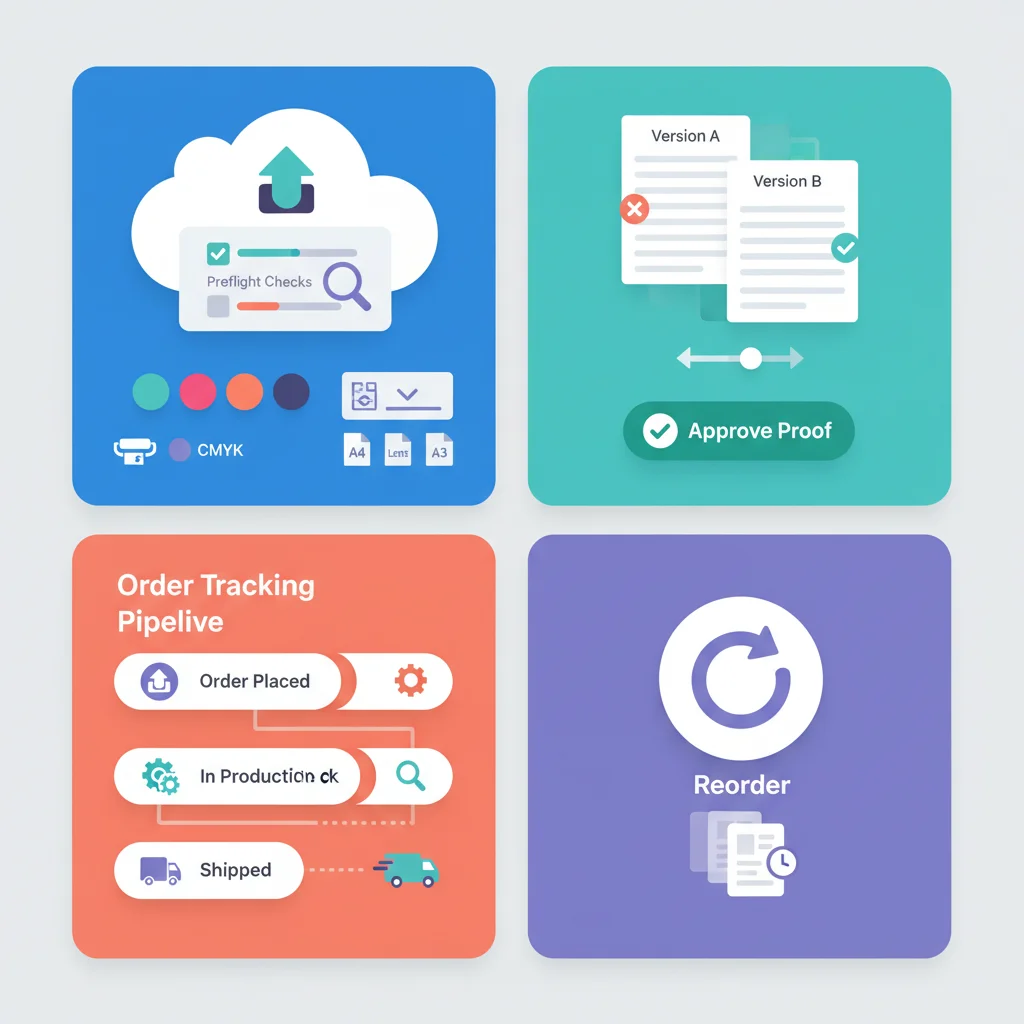
A portal with structured file upload handles this at the point of submission. Upload forms specify accepted formats, minimum resolution, and required dimensions. Preflight checks can catch common issues automatically before the file enters production. And when a customer does need to resubmit, the portal makes it clear what’s wrong and what they need to provide — instead of an email that gets ignored for a week.
Proof approval is a bottleneck
Proof approval is where orders stall. You prepare a proof, email it, and wait. The customer is busy. They forward it to their boss. Their boss is traveling. Three days later, someone replies “approved” but you’re not sure which version they’re looking at because you sent a corrected proof yesterday. Or they call and say “approved” and you have nothing in writing.
A portal with a formal proof approval workflow presents proofs with clear version numbers, a comparison view against previous versions, and explicit approve/reject buttons. The approval is timestamped, attributed to a specific person, and tied to a specific proof version. When a customer later claims “that’s not what I approved,” you have the documentation.
Order status questions consume staff time
“Is my order ready?” “When will it ship?” “Did you get my files?” These are the most common inbound calls and emails at any print shop. Each one interrupts production, and the answer usually requires someone to check the job tracking system and report back.
A portal with order tracking lets customers check status themselves. Submitted, in prepress, in production, quality check, ready for pickup/shipped — each stage updates automatically, and customers can see exactly where their job is. The phone stops ringing for status updates.
Reorders require starting from scratch
A significant portion of print shop revenue comes from repeat orders — business cards, letterheads, brochures, labels, packaging, signage. When a customer calls to reorder, someone has to find the original job, confirm the specifications, and verify that the files are still current. If the customer wants a small change (“same business cards but with my new phone number”), the back-and-forth begins again.
A portal with order history and reorder functionality lets customers browse their past jobs, select one to reorder (with or without modifications), and submit the new order. The original files, specifications, and pricing are all preserved. One-click reorder for unchanged items. This is a massive time-saver for both the customer and the shop.
Quoting is slow and inconsistent
Custom print jobs require quotes, and generating quotes takes time — calculating paper costs, setup fees, quantity breaks, finishing options, and turnaround premiums. When quotes happen via email or phone, customers wait for a response, and the shop loses jobs to competitors who respond faster.
A portal with automated quoting (or at minimum, a structured quote request form) lets customers get pricing quickly. For standardized products (business cards, flyers, banners), an instant pricing calculator can generate quotes automatically. For custom work, a structured request form captures all the details upfront so the quote can be prepared without back-and-forth.
Key Features for Print Shop Portals
- File upload with preflight — Structured upload forms with file format validation, resolution checks, and bleed/trim guidance.
- Proof approval — Version-controlled proofs with annotate, approve, and reject workflows and timestamped approval records.
- Order tracking — Real-time job status from submission through production to shipping or pickup.
- Reorder capability — Browse past orders and reorder with or without modifications, with preserved files and specs.
- Automated quoting — Instant pricing for standard products and structured quote request forms for custom jobs.
- Product catalog — Browse available products, sizes, paper stocks, finishing options, and turnaround times.
- Billing and payments — View invoices, make payments, manage credit accounts, and access billing history.
- Brand asset management — Store logos, brand guidelines, approved templates, and commonly used files for easy access.
- Order history and reporting — Complete history of all orders with spend tracking and reporting for business customers.
- Multiple user accounts — Businesses set up accounts with multiple users, approval hierarchies, and spending limits.
Print Shop Portal Software
- PrintSmith Vision — EFI’s print business management system with estimating, job tracking, invoicing, and a web-to-print customer storefront.
- Aleyant PrintJobManager — Web-to-print and print MIS with online ordering, job management, and customer portals.
- MarketDirect StoreFront — EFI’s web-to-print solution that lets print shops offer branded online storefronts for customer ordering.
- PageFlex — Web-to-print and marketing portal platform with template-based ordering and brand management.
- Infigo — Web-to-print storefront and editor platform for print shops with product customization, proofing, and order management.
- PrinterPresence — Website and web-to-print solutions for commercial printers with online ordering and customer portals.
- Gelato — Print-on-demand platform with a focus on global production and APIs for software integration (more relevant for print resellers than traditional shops).
For smaller print shops that don’t need a full web-to-print platform, a combination of a general-purpose portal like SuiteDash (for file sharing, proofing, and invoicing) with your existing print MIS can provide a customer-facing experience without the complexity of enterprise web-to-print software.
The Business Case for Self-Service
Print shops operate on tight margins. Every minute spent answering “is my order ready?” calls, chasing proof approvals, or requesting higher-resolution files is a minute not spent on production. The math on a portal is straightforward:
Reduced prepress rework. When file upload forms catch issues at submission, your prepress team spends less time fixing files or waiting for resubmissions. Structured upload requirements educate customers over time — regulars learn to submit print-ready files.
Faster proof cycles. Moving from email proofing (average 2-3 days per round) to portal proofing (often same-day) accelerates the entire production timeline. Faster proofing means faster delivery, which means higher customer satisfaction and the ability to take on more jobs.
Self-service status checks. If your shop handles 50 jobs per day and each generates one status inquiry, that’s 50 phone calls or emails. A portal eliminates most of them.
Higher reorder rates. When reordering is easy (click, confirm, pay), customers reorder more frequently and are less likely to shop around. The convenience creates stickiness.
For a detailed look at the financial case for portals, see our article on ROI of Customer Portals.
What a Print Shop Portal Looks Like in Practice
A marketing manager at a mid-size company needs 500 brochures for a trade show next month. She logs into her print shop’s portal and clicks “New Order.” She selects “Brochures” from the product catalog, picks the paper stock (100# gloss text), size (8.5x11, tri-fold), quantity (500), and turnaround (standard 5-day). The portal shows the price instantly: $387. She uploads her PDF, and the portal’s preflight check runs automatically — flagging that her file is in RGB color space instead of CMYK and that the bleed is only 0.0625” instead of the required 0.125”. She downloads the spec guide, fixes the file in InDesign, and re-uploads. Preflight passes. She submits the order.
The next day, she gets a notification: her proof is ready for review. She opens the portal, sees a high-res PDF proof with crop marks, and zooms in to check the phone number on the back panel. She spots a typo that was in her original file — not the shop’s fault, but she catches it now rather than after printing. She clicks “Request Revision,” annotates the typo directly on the proof, and re-uploads a corrected file. The shop turns around a new proof by the afternoon. She approves it with a click, and the proof approval is logged with her name, timestamp, and the specific version number. The job moves into production.
Over the next four days, she checks the portal twice to see progress: prepress complete, on press, cutting and folding, quality check, ready for shipping. The brochures arrive on schedule. Three months later, she needs another 500 for a different show. She opens the portal, finds the original order in her history, clicks “Reorder,” and the job is submitted with the same specs and approved files in under a minute.
Platforms like Infigo power exactly this kind of experience for commercial printers. Customers browse a product catalog with real-time pricing, customize products using built-in design editors, upload files with automated preflight, and track orders through production. For print shops that serve business clients with recurring needs, Infigo’s template and brand management features let companies set up pre-approved designs that authorized employees can order without going through a full approval process — business cards, for example, where each employee customizes their name and title from a locked template.
For shops running EFI’s print management tools, MarketDirect StoreFront integrates with PrintSmith Vision to provide a seamless connection between the customer-facing storefront and the production workflow. Orders placed through the storefront flow directly into job tickets without manual re-entry — eliminating one of the most common sources of production errors.