
Wedding and event planning is a coordination sport. You’re managing timelines, vendor contracts, budgets, seating charts, menus, design details, and client expectations — often for multiple events simultaneously. Your clients are excited, anxious, and full of questions at all hours. And the tools you’re using — email, spreadsheets, shared Google Docs, and Pinterest boards — weren’t built for this.
A client portal for wedding and event planners gives your clients a single, branded space to see their timeline, track the budget, review vendor details, approve selections, and communicate with your team. Less “did you see my text?”, more “everything’s in the portal.”
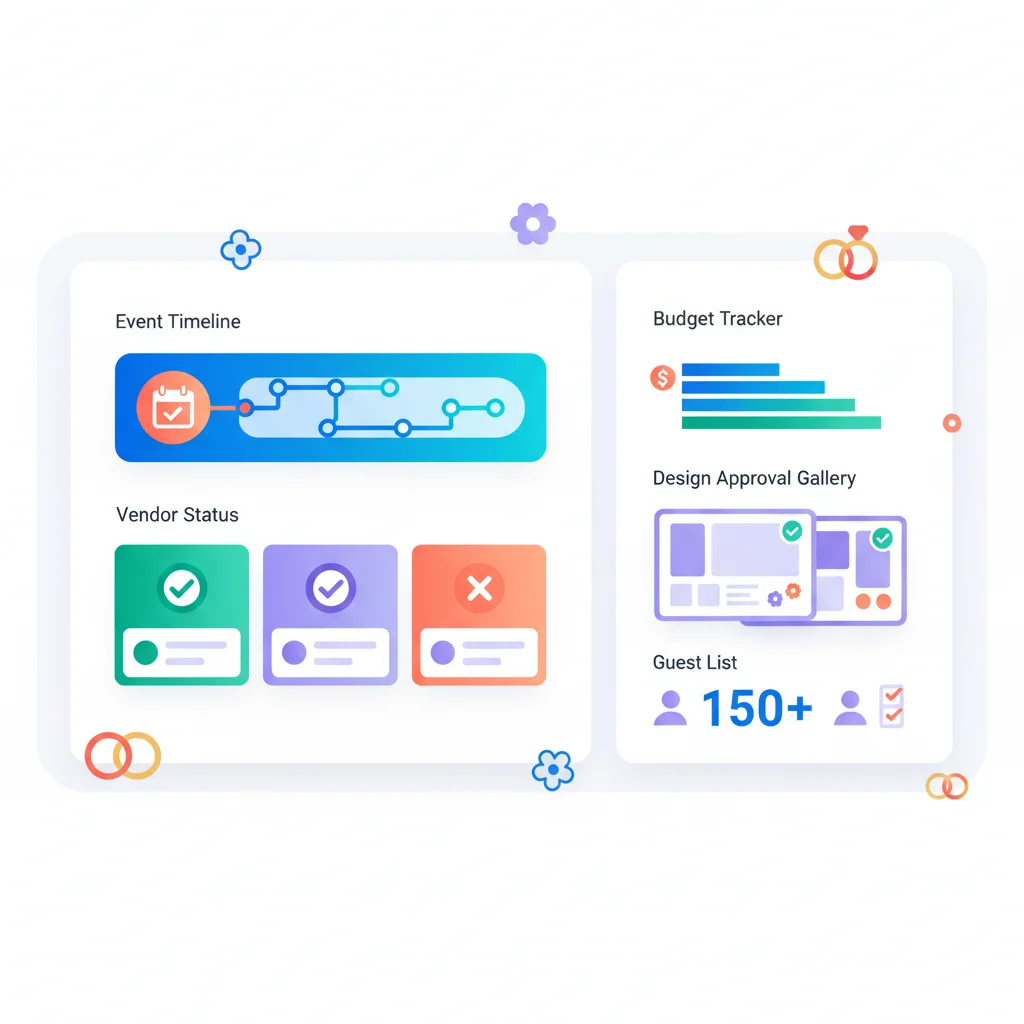
Problems a Portal Solves for Wedding & Event Planners
Clients ask the same questions over and over
“When is the cake tasting?” “What’s the florist’s name again?” “How much do we have left in the décor budget?” “Did the photographer confirm?” These questions come in constantly — by text, email, phone, and Instagram DM — because clients don’t have a single place to find the answers themselves.
A portal with a self-service dashboard puts every detail at the client’s fingertips. The complete timeline, vendor contact list, budget summary, and upcoming decisions are all visible the moment they log in. When clients can answer their own questions, your phone stops buzzing at 10 PM on a Tuesday.
Budget tracking is a spreadsheet nightmare
Wedding budgets are complex and constantly shifting. The original budget allocates $5,000 for flowers, but the client falls in love with peonies and the estimate jumps to $7,500. The venue includes tables and chairs but not linens. The DJ costs less than expected so there’s room to upgrade the photo booth. Tracking all of this in a shared Google Sheet works until it doesn’t — cells get accidentally edited, formulas break, and the client sees numbers they don’t understand.
A portal with budget tracking shows the client a clean, live view of their budget: allocated, committed, spent, and remaining — broken down by category (venue, catering, flowers, photography, entertainment, attire, etc.). When the florist estimate increases, the client sees the impact on the total budget immediately, including which categories have room to absorb the overage.
Vendor coordination is distributed across too many channels
A typical wedding involves 10-15 vendors: venue, caterer, photographer, videographer, florist, DJ/band, baker, officiant, hair/makeup, rental company, lighting, transportation, stationery. Each has their own timeline, contract, and communication thread. Keeping the client informed about vendor status — who’s confirmed, who needs a deposit, who needs a final headcount — requires constant manual updates.
A portal with a vendor management view shows clients the status of every vendor: contracted, deposit paid, final balance due, confirmed for the event date. Contracts and invoices are stored alongside each vendor. The client can see at a glance that 12 of 15 vendors are confirmed and the caterer still needs the final menu selection.
Design decisions take too many email rounds
Mood boards, color palettes, table settings, invitation suites, ceremony décor, reception layouts — event design involves dozens of visual decisions. When these are shared via email (PDF mood boards, Pinterest links, photos from vendor sites), feedback gets fragmented and decisions take weeks instead of days.
A portal with visual approval workflows presents design options in an organized gallery. Clients browse options, leave comments, and approve or request changes — all in one place. The planner sees the decision status for every design element without chasing email threads.
Day-of logistics are hard to communicate
The event timeline, vendor arrival schedules, setup instructions, emergency contacts, and event-day logistics need to be communicated clearly to multiple parties — the clients, the wedding party, family members, the venue coordinator, and sometimes the vendors themselves.
A portal with a shared event timeline and logistics view gives everyone access to the information they need. The couple sees the ceremony-to-reception flow. The best man knows when the first dance is. The mother of the bride has the vendor emergency contact list. All from one source of truth, updated in real time.
Key Features for Wedding & Event Planning Portals
- Event timeline — Detailed planning timeline from engagement/booking through event day, with milestones, deadlines, and task assignments.
- Budget tracker — Live budget view by category showing allocated, committed, spent, and remaining amounts.
- Vendor directory — Contact information, contracts, payment status, and confirmation status for every vendor.
- Design galleries — Visual presentation of design options (florals, table settings, invitations, décor) with approval workflows.
- Task management — Shared to-do lists with assignments for both the planner and the client (book hotel block, finalize guest list, schedule fittings).
- Guest list management — Track RSVPs, meal selections, table assignments, and plus-ones.
- Document storage — Contracts, insurance certificates, permits, floor plans, and venue specifications.
- Messaging — Secure communication organized by topic (design, logistics, budget, vendors) rather than one long thread.
- Day-of timeline — Minute-by-minute event schedule shared with clients, wedding party, and vendors.
- Payment tracking — Planner fee installments, vendor payment schedules, and complete payment history.
Wedding & Event Planning Portal Software
- Aisle Planner — Purpose-built for wedding planners with a client portal, design boards, budgeting, timelines, vendor management, and guest list tools.
- HoneyBook — Client management platform popular among wedding planners and event professionals with contracts, invoicing, scheduling, and a client portal.
- Dubsado — Client management with workflows, contracts, invoicing, forms, and a client portal. Highly customizable for event planning businesses.
- Rock Paper Coin — Payment platform designed for the wedding industry that handles planner-to-vendor payments, client billing, and financial management.
- Planning Pod — Event management platform with budgets, timelines, floor plans, vendor management, and attendee management.
- Allseated — Event collaboration platform with 3D floor plans, seating charts, and timeline tools that can be shared with clients.
- 17hats — Business management for solopreneurs with CRM, contracts, invoicing, questionnaires, and a client portal.
For planners who need more advanced guest management, dedicated RSVP and guest list platforms like Zola (for weddings) or Splash (for corporate events) handle the guest-facing experience, while your portal manages the planning relationship.
The Emotional Dimension
Event planning — especially wedding planning — is unlike most client relationships because the emotional stakes are exceptionally high. A website redesign that’s a week late is annoying. A wedding where the flowers are wrong is devastating. Clients aren’t just buying a service; they’re entrusting you with one of the most important days of their life.
This emotional context means that communication failures hit harder. When a bride texts about the seating chart and doesn’t hear back for two days, she doesn’t think “my planner is busy” — she thinks “my planner doesn’t care about my wedding.” A portal that gives clients constant, visible access to their planning progress provides reassurance between meetings. They can see that things are moving forward even when you’re not actively texting them.
The portal also manages expectations. When the timeline clearly shows that menu tasting happens in month 5 and they’re in month 2, clients stop asking about it. When the budget tracker shows they’ve allocated their full décor budget, the conversation about that extra centerpiece upgrade becomes data-driven rather than emotional.
For more on how portals improve client communication, see our client communication use case.
What a Wedding Planning Portal Looks Like in Practice
Jessica and Mark got engaged in January and booked their planner, Lauren, in February. Their wedding is in October. At their first meeting, Lauren walks them through the planning process and introduces them to their client portal.
When they log in for the first time, they see a planning dashboard: a timeline stretching from February to October with major milestones — book venue (done!), hire photographer (next up), send save-the-dates (May), first dress fitting (June), final vendor payments (September), rehearsal dinner (October). Each milestone is color-coded: green for complete, yellow for in-progress, gray for upcoming. Below the timeline, their budget shows $45,000 total with $12,000 already committed to the venue.
Over the next few months, the portal becomes their planning home base. Lauren posts three photographer options in the design gallery, each with portfolio samples, pricing, and her recommendation. Jessica and Mark browse the options over wine one evening, leave comments (“love Photographer B’s candid style but Photographer A’s pricing is better”), and approve Photographer B the next morning. Lauren sees the approval instantly and sends the contract. No email chain. No phone call.
The vendor directory fills up as contracts are signed: venue (confirmed, deposit paid), photographer (confirmed, deposit paid), caterer (pending final menu tasting), florist (pending, meeting next week), DJ (confirmed). When Mark’s mother asks “do you have a caterer yet?”, Mark opens the portal and shows her the status of every vendor. End of conversation.
Aisle Planner was built specifically for this workflow. Planners create visual design boards that clients review and approve, manage timelines with task assignments for both planner and couple, track budgets with real-time category breakdowns, and coordinate vendors with contract storage and payment tracking. The client-facing experience is polished and on-brand, which matters in an industry where aesthetics signal competence.
For solo planners who want something lighter, HoneyBook handles the business essentials — contracts, invoicing, scheduling, and client communication — through a clean portal interface. It doesn’t have the wedding-specific features of Aisle Planner (no design boards or guest list management), but for planners who use other tools for design and guest tracking, HoneyBook provides the client-facing structure and payment management that keeps the business side professional.
The guest list management piece often runs separately through a tool like Zola, which handles RSVP collection, meal choices, and registry. While this means the couple uses two systems (the planning portal and the wedding website), the separation usually makes sense — the portal is for the planning relationship between planner and couple, while Zola is for the guest-facing experience.
As the wedding approaches, the portal shifts from planning mode to logistics mode. Lauren posts the day-of timeline: vendor arrivals, ceremony start, cocktail hour, reception entrance, first dance, toasts, cake cutting, last dance. Jessica and Mark share the timeline link with the wedding party. Everyone knows where to be and when. On the wedding day, Lauren updates the timeline in real time from her phone — “ceremony starting 10 minutes late” — and the wedding party sees it without anyone making panicked phone calls.